

Blog
Recent records in Business Central 29: what the Recent button remembers, and what it does not
Business Central users pick the same twenty customers, vendors and items all day. Until this autumn the product had no memory of that: every lookup opened on the full list, sorted by number, and the user typed or scrolled to the same record they had chosen an hour earlier. Version 29, the 2026 release wave 2 update, adds that memory. Microsoft describes it in two sentences, so we spent an afternoon in a version 29.0 test environment finding out what it actually does. Everything below comes from that session.
The Recent button in lookups
Open the dropdown on any field that points at another table and there is a new Recent button in its footer, between New and the settings icon.
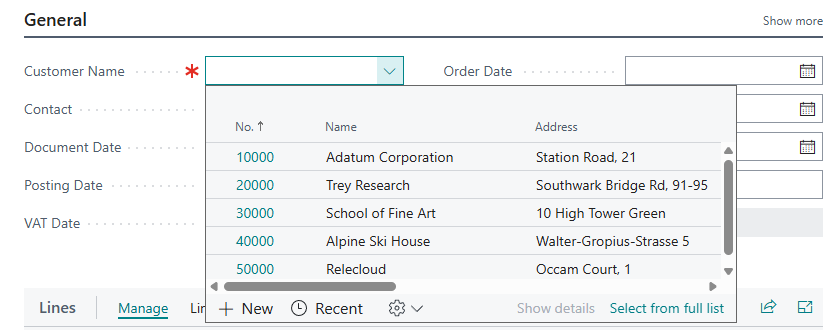
Select it and the list shrinks to the records you have worked with lately, newest first. Before we had opened anything, the view was empty. After opening three customer cards, it showed exactly those three. The button turns into Search to take you back to the full list.
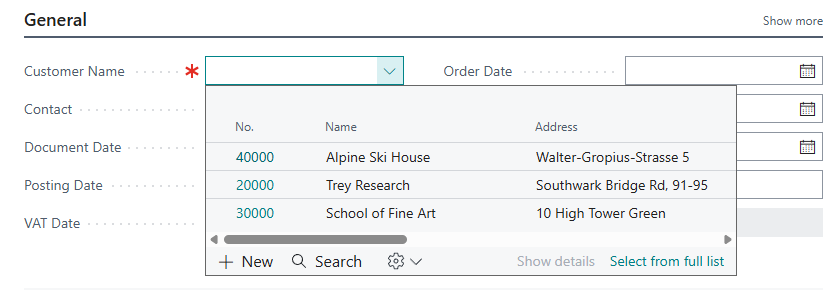
The dropdown remembers the mode you leave it in. When we opened the customer lookup on the next new order, it came up straight in Recent view without being asked. The item lookup on the lines, which we had never switched, still opened on the full list. That is convenient for the person who lives in Recent view, and confusing for the colleague who sits down at their screen and wonders where the other customers went. One line in user training covers it.
The memory belongs to the table, not the page
We picked item 1908-S, LONDON Swivel Chair, from the lookup on a sales order line. Then we created a purchase order, opened the item lookup on its first line and switched to Recent. The chair was there.
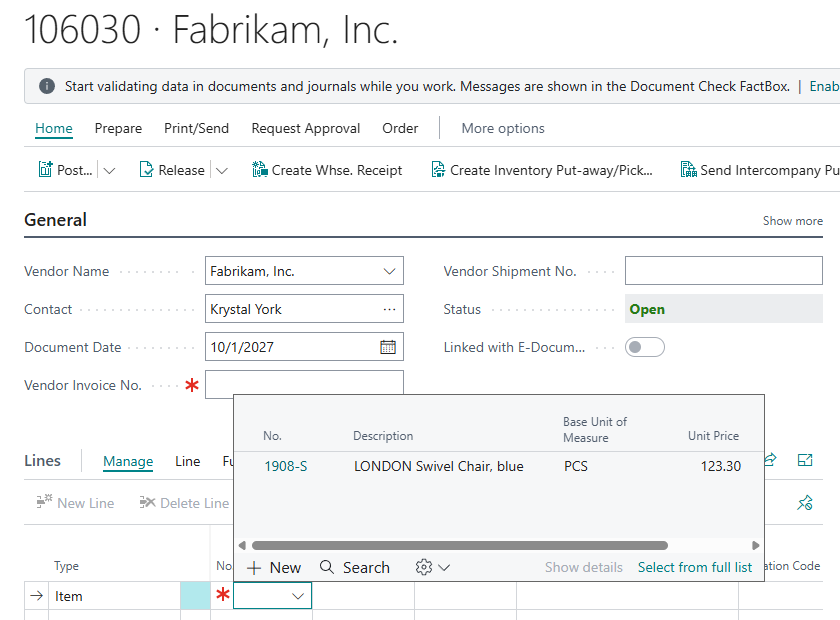
There is one history per user for each table, shared by every page that looks that table up. For most people that is what they want. For someone who handles both sales and purchasing, the item they looked up for a customer question will sit at the top of their next purchase line.
What counts as “recent”
This was the part we most wanted to pin down, because Microsoft’s description only says “recently accessed or worked with”. In our tests:
Remembered
- Opening a card from a list (each of the three customers).
- Opening an existing document from its list (sales order 101005).
- Picking a value from a lookup dropdown (the swivel chair).
Not remembered
- Scrolling through a list, even with the FactBox showing a record’s details.
- Typing a value into a field and tabbing out. We entered both the customer and the vendor on our test orders this way, and neither appeared.
- Records we created ourselves during the session (the new sales and purchase orders).
So the history follows deliberate selection, not every record that crosses the screen. That is the right design for a lookup shortcut. It also means a user who types customer numbers from memory will see their Recent view stay emptier than a colleague who clicks.
One more observation, mostly for testers. The very first card we opened was not recorded: we had left it by reloading the browser rather than closing the page. Every card closed normally was. If you demonstrate the feature, close pages the ordinary way.
Recents in Tell Me
Tell Me (Alt+Q) got the same treatment. Open it before typing anything and it lists pages you opened recently, each with its category.
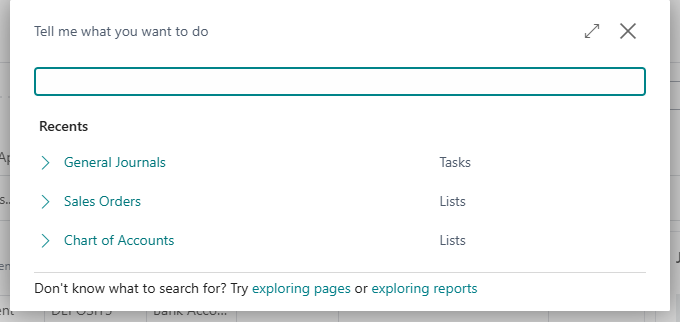
It lists where you went, not what you typed, which is the more useful of the two. Most of our entries came from searches, but not all: the customer list, opened straight from a link, turned up there as well. The list also carried over to a new browser session, though not always in full. After one reload, two of our three entries came back, and after we switched the user’s language the old entries were gone and the list started again.
Where the history lives
The lookup history is stored in a new system table, Recent Record (table 2000000174). It is not documented on Microsoft Learn yet, but you can look at your own rows by adding &table=2000000174 to the Business Central URL.
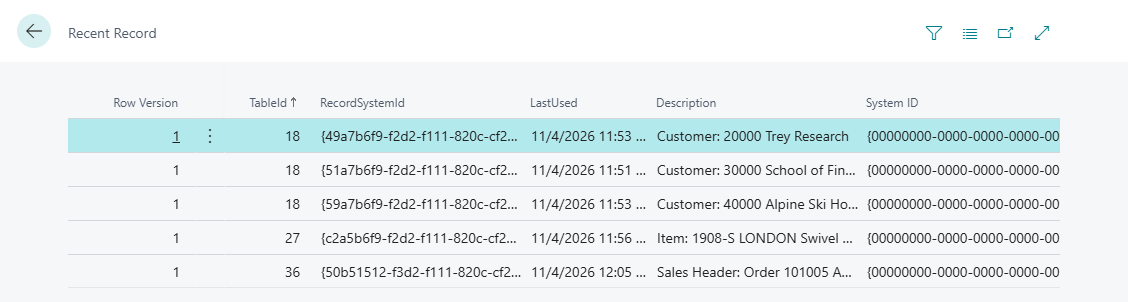
Each row holds the table number, the record’s system ID, the time it was last used and a readable description such as “Customer: 20000 Trey Research” or “Sales Header: Order 101005 Adatum Corporation”. There is one row per record. Using it again moves the timestamp rather than adding a line. The description follows the reader’s language: when we switched our test user to Lithuanian, the same rows read “Pirkėjas: 20000 Trey Research” and “Pardavimo antraštė: Užsakymas 101005 Adatum Corporation”, so it is built when the row is read rather than stored as text. Microsoft’s own description of the table, shipped with the product, says it is scoped to the current user and the current company. You only ever see your own history, in the company you are signed in to.
Two consequences matter to anyone running a Business Central environment:
- Users cannot clear it themselves today. The table view is read-only: the only row action is Select More. The table does allow rows to be deleted, but only from an extension, and no standard page offers a “clear my history” button yet.
- Extensions can build on it. It needs no permission set, so a small extension could, for example, show a user’s recent customers on their role centre. Treat it as you would any undocumented system object: test it in a sandbox and read the version 30 release notes before relying on its shape.
What it is not
A table of “records the user opened” sounds like an access log. It is not one, and it should not be presented to an auditor as one:
- It only sees what a person does in the client, and only some of that, as the tests above show. Reports, job queues, APIs and integrations leave no trace.
- Each user sees only their own history.
- It keeps one timestamp per record, the latest. There are no earlier visits and nothing about which page the user came from.
If the requirement is “who looked at or changed this record”, the answer is still the change log, the system “modified by” fields and telemetry. Recent Record exists to save the person at the keyboard a few seconds, many times a day.
What we would tell users on Monday
- The Recent button is there, and it sticks. Switch a lookup to Recent once and it stays that way until you switch it back.
- It learns from what you open and pick, not what you type. Users who type numbers will get little out of it; users who pick from lists will see it fill within a day.
- History is shared across documents. An item you picked on a sales order will appear when you look up items on a purchase order.
- Alt+Q remembers destinations. Pages you opened recently are one click away the next time you open Tell Me.
In our environment none of it needed any setup, and none of it touches posting or business data. It is a small feature that sales order entry, purchase lines and journals use dozens of times a day, and that is where the time comes back.
Planning version 29 training for your users, or wondering what your extensions could do with the new table? Tell us your story and we will walk through it with you.