

Blog
PTE deployment is moving to the admin centre: what to change before April 2027
For as long as Business Central has existed online, a per-tenant extension reached production the same way: someone with the right permission set opened the Extension Management page inside the environment, uploaded the .app file, and pressed Deploy. Update 28.4, rolling out this month, changes the address. PTEs can now be uploaded, installed, scheduled and uninstalled from the Business Central admin centre and its API, and Microsoft has announced that the in-product upload will be removed in 2027 release wave 1, version 30, due in April 2027. The Extension Management page stays, but only to view what is installed.
This is a small feature with a hard date attached, which is exactly the kind of change that gets ignored until it breaks a release. Our clients with a single PTE and a partner who deploys it will barely notice. Anyone with automation, more than one person deploying, or a habit of “just uploading the fix” should read on.
What the new experience does
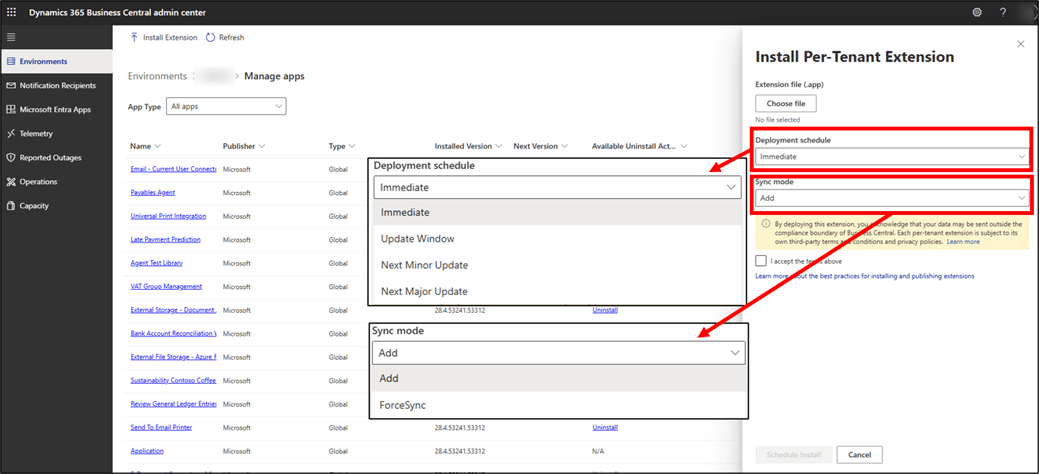
In the admin centre, the environment’s Manage Apps page now has an Install Extension action. You pick the .app file, choose a sync mode, and choose a deployment schedule: install immediately, during the environment’s next update window, or at the next minor or major update. One limit to know: a PTE that has never been deployed to the environment can only go immediately or in the next update window; staging it for a future major update is refused with an “no existing deployed version to upgrade from” error. The same page lists upcoming extension versions, lets you cancel a scheduled install, and lets you uninstall a PTE, which the old Automation API never offered.
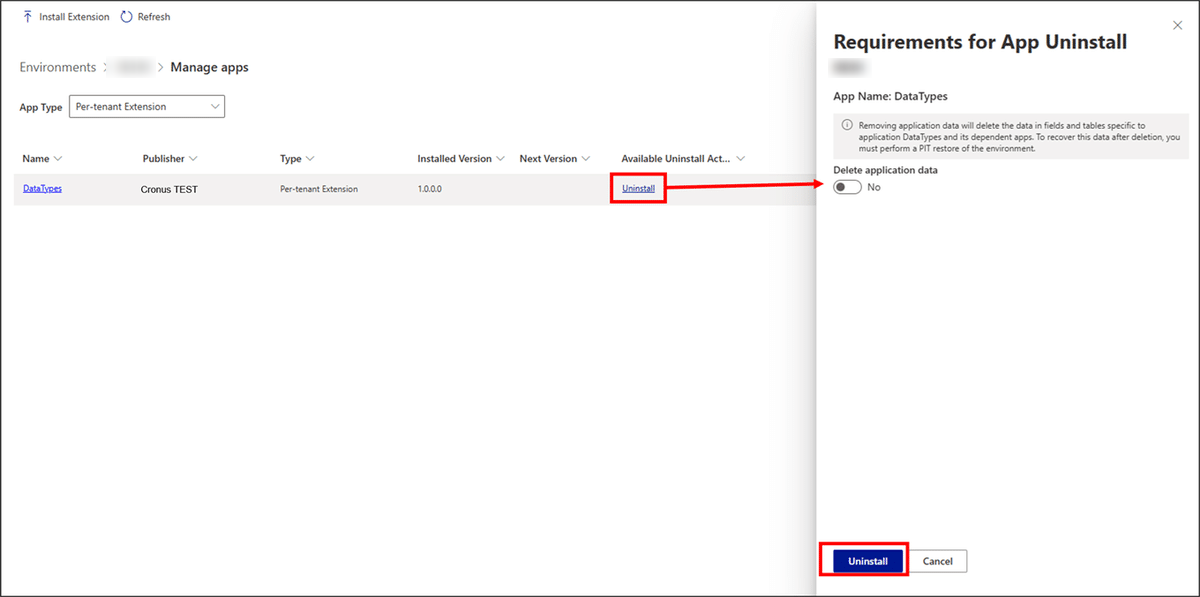
Uninstalling gets the same treatment. The Requirements for App Uninstall pane lists dependent apps and asks explicitly whether application data should be deleted with the extension, with the toggle defaulting to no.
The admin centre API version 2.29 exposes all of it. The install call is a multipart upload to /admin/{apiVersion}/applications/{applicationFamily}/environments/{environmentName}/apps/pteInstall, so a build pipeline can push an .app directly without the Automation API’s configuration overhead. The same endpoints are also surfaced as tools on the admin centre MCP server, so the “deploy version 1.4.2 to the UAT environment during its next update window” instruction can come from a script or from an AI assistant in VS Code.
The two things that will catch people out
The two surfaces do not talk to each other yet. A PTE installation scheduled from Extension Management is invisible in the admin centre until it completes, and vice versa. Microsoft’s own advice is not to mix them on the same environment during the transition. If your partner deploys from inside the environment and your IT team looks at the admin centre, one of them is going to see a stale picture. Pick one surface per environment now and write it down.
Who is allowed to deploy changes. Uploading through Extension Management needed the EXTEND. MGT. - ADMIN permission set, which is a Business Central permission. The admin centre needs an admin centre role: Dynamics 365 Business Central Administrator, Dynamics 365 Administrator, or a delegated admin relationship for the partner. Those are different people in most organisations. A developer who could deploy their own hotfix yesterday may not be able to in April 2027, and that is arguably the point: production deployments become a tenant-administration act with an audit trail, not a page action inside the application.
Why we think this is the right direction
We have seen too many production environments where nobody could say with confidence which PTE version was live, who installed it, or when. Consolidating deployment into the admin centre gives every install a place in the Operations log, a scheduled slot tied to the update calendar, and an API that a pipeline can call without workarounds. It also aligns PTEs with how AppSource apps have been managed for years, so there is one list of apps per environment rather than two. The cost is a little ceremony, and convenience is what let undocumented deployments happen in the first place.
What we would do first
- Inventory who deploys today. List every person and every script that has uploaded a PTE in the last year. The admin centre’s app list and the environment’s Extension Management page together give you the current state.
- Decide the surface per environment. Production and UAT go admin centre only, starting now. Leave developer sandboxes on whichever path the developer prefers until April.
- Grant the roles deliberately. Whoever will deploy to production needs an admin centre role or a delegated admin relationship. Do not hand out Dynamics 365 Administrator to a developer just to keep a habit alive; use the partner delegated admin route where a partner does the deployments.
- Move the pipeline before you are forced to. If a build script calls the Automation API to install extensions, rewrite it against admin centre API 2.29 this autumn while both paths work. You will find the permission and scheduling questions with time to spare.
- Use the schedule. “Install at next update window” is a better default for production than “immediately”, because it puts the change where users already expect downtime.
None of this is urgent in the sense of breaking tomorrow. It is urgent in the sense that April 2027 is two major updates away, and a deployment process is the worst possible thing to discover has stopped working on the day you need to ship a fix.
Not sure who can deploy to your production environment, or how? Tell us your story and we will map it out with you.